
Playbox AI Review (2026): Free Credits, Templates & Verdict
A concise Playbox AI review covering video templates, free credits, real monthly prices, face drift, legitimacy, and how it compares with Remix.Camera.
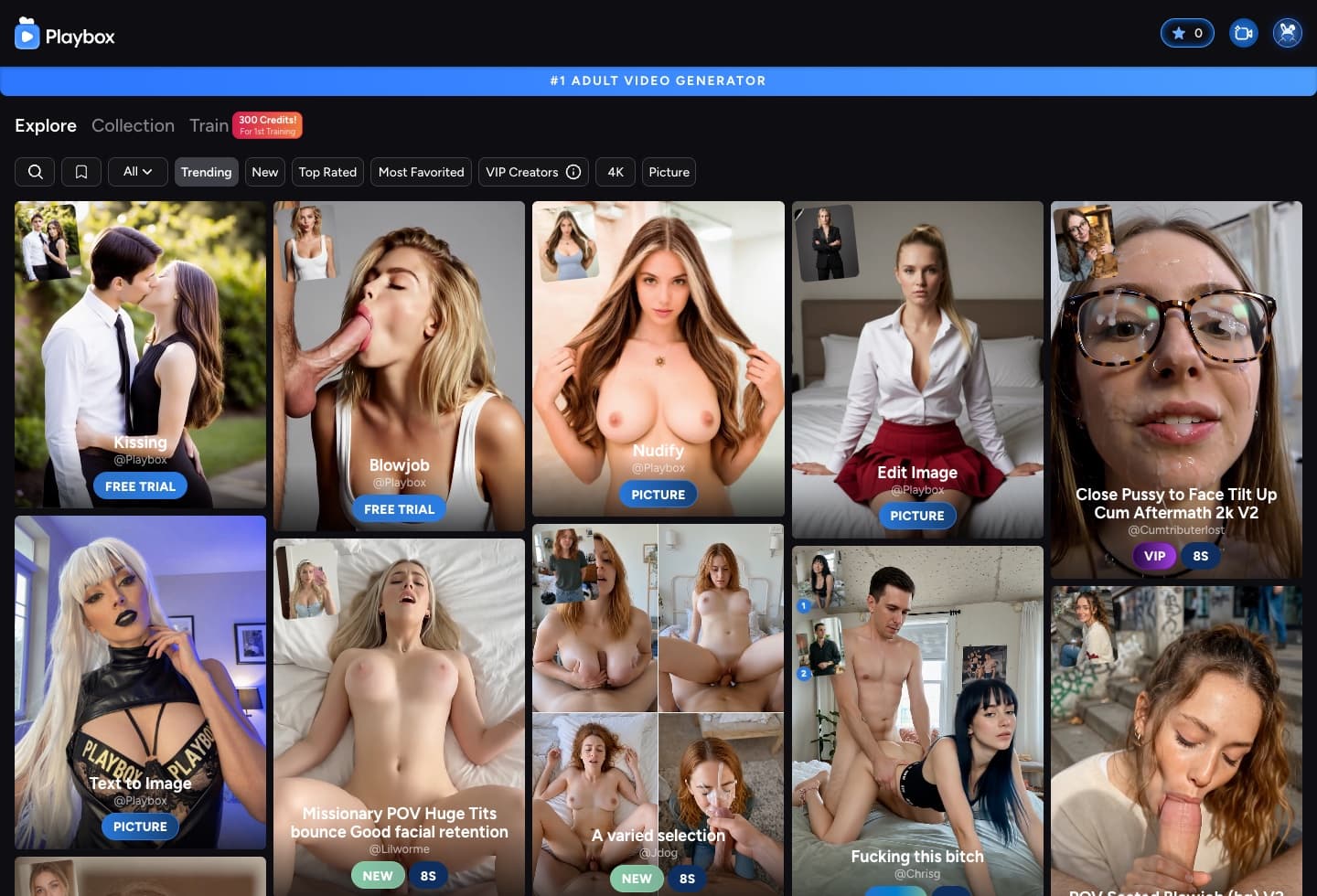
Playbox AI turns an image into a short adult video using a motion template. Choose a preview, upload an image with similar pose and framing, and generate.
For alternatives, browse the AI image and video tool directory. If model quality matters more than templates, inspect the controlled benchmark index and the 15-output Seedream comparison.
Playbox free credit options: what is actually free?
Playbox does not advertise one recurring free-credit allowance for every account. The current free routes are selected templates marked FREE TRIAL, a free spin page, and 5 referral credits when a friend signs up. The 300-credit first-training offer is for creator template training, not ordinary generations. Start with a FREE TRIAL template to test face transfer without paying.
| Free route | Published offer | Important limit |
|---|---|---|
| FREE TRIAL templates | Selected templates are marked FREE TRIAL in the public feed | Sign-in is required before upload |
| Free spin | A free spin is available on Playbox's credit page | The public page does not promise a fixed credit amount |
| Referral reward | 5 credits for each friend who signs up | Referral credits expire after 30 days |
| First template training | 300 credits for the first training | This applies to creator-template training, not normal generations |
How Playbox templates work
| Feature | What it does | What to watch |
|---|---|---|
| Explore and template library | Sort community templates by new, trending, top-rated, most-favorited, VIP creator, 4K, or picture tools | A polished preview does not guarantee a clean transfer |
| Template image-to-video | Apply a prebuilt motion to one uploaded or saved image | Pose, crop, and camera-angle mismatch can cause body or face drift |
| Extend Video | Continue a generated clip with another compatible motion | Longer clips give identity more opportunities to drift |
| Text to Image and Edit Image | Prepare a source frame inside Playbox | These are support tools, not a full image editor |
| Train a template | Learn a reusable motion from example clips | The advertised first-training price differs from a logged-in July capture; verify the live cost |
The template supplies most of the motion, so source-image geometry matters more than a long prompt. Match the preview's face direction, crop, body position, camera angle, and number of subjects before generating.
What is the Playbox AI model?
Playbox does not name one foundation video model on the public generator, pricing, or training pages we reviewed. Labels such as FREE TRIAL, VIP, BLEND, 4K, PICTURE, and duration describe access or output behavior—not a disclosed base model. Its Train feature learns a reusable motion from example clips; it is not evidence of a persistent identity model for one person.
Best Playbox templates: four checks before you generate
Choose in this order
Start with FREE TRIAL
Use a free template to see whether Playbox keeps the face before you spend credits.
Match the first frame
Compare face direction, crop, body position, camera angle, and number of people.
Check creator proof
Prefer clear input instructions, recent ratings, and examples that resemble your source.
Test one short action
Choose a simple motion first. Use Extend Video only if the face stays consistent.
Playbox credit pricing, plan limits, and 30-day expiry
| Plan | Listed price | Monthly credits | $10 top-up | Maximum output |
|---|---|---|---|---|
| Basic | $9.99 | 300 | 300 credits | 7 seconds · medium · 45 FPS |
| Pro | $29.99 | 1,500 | 500 credits | 12 seconds · high · 60 FPS |
| Premium | $49.99 | 3,000 | 600 credits | 12 seconds · high · 60 FPS |
Playbox presents the lower $4.99, $14.99, and $24.99 figures as annual-billing monthly equivalents. Its FAQ says subscriptions do not auto-renew and all credits expire after 30 days, including subscription, top-up, check-in, and referral credits. Before paying, verify the selected billing period, final Telegram Stars or crypto conversion, delivered credits, and expiry date at checkout.
Playbox AI reviews: what users report about realism and face drift
We retained specific generation and payment reports from three Playbox-related Reddit communities, excluding referral posts, duplicated copy, and generic rankings. These are public anecdotes, not verified purchases.
“The quality is very good as far as where we are with realistic deep fake generation goes. … you will end up paying 30% more then the listed price just for the transaction if you go that route.”
“Out of the 10 I generated, only two came out decently. The likenesses were nowhere near it. … It'll eat through your paid credits really quickly.”
“It uses the photo I upload for the first frame but then switches back to the original demo subject. At this point im just throwing away credits trying to get it to work lol”
“It's expensive af but dear lord is it unbelievably realistic accurate”
How to test Playbox before paying
- Use an authorized adult subjectUpload only yourself, a consenting adult, or a clearly fictional adult character—never a minor or someone whose age is uncertain.
- Match the previewChoose a source with similar crop, pose, camera angle, face direction, and subject count.
- Run a FREE TRIAL templateCheck face stability, hands, body geometry, and whether the motion follows the preview.
- Audit the real costVerify checkout totals and credit expiry, then divide the amount paid by clips you would actually keep.